How to disable the Voice Guide function on your Samsung TV
Last Update date : Mar 13. 2026
How to Disable Voice Guide
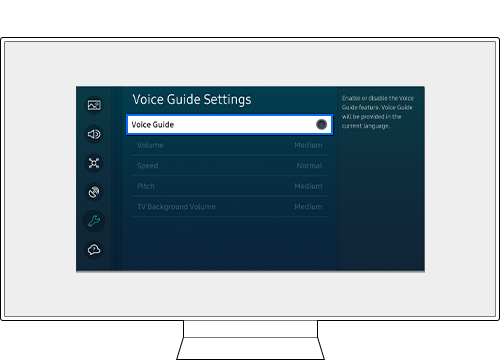
To disable the Voice Guide function, follow the steps below.
Step 1. Navigate to Home > Menu > Settings > All Settings.

Step 2. Go to General & Privacy > Accessibility.

Step 3. Select Voice Guide Settings and disable Voice Guide.

From a Smart Remote, you can press and hold the +/- (Volume) button for 2 seconds or longer to easily access Accessibility Shortcuts and turn off the Voice Guide menu.
Note:
- Even if Voice Guide is set to Off or muted, the voice guide for Accessibility Shortcuts will be enabled.
- If you are having trouble with your Samsung Smart TV, you should always check to see if there are any software updates available as these may contain a fix for your problem.
- Device screenshots and menus may vary depending on the device model and software version.


Service Centers


Locate the nearest Samsung service center to have your product checked.
Thank you for your feedback!
Please answer all questions.
Contact Info
WhatsApp
![WhatsApp]()
![WhatsApp]()


Help you is now easier through our official WhatsApp channel.
Monday to Sunday
8:00 a.m. a 12:00 a.m.
Monday to Sunday
8:00 a.m. a 12:00 a.m.
LiveChat
![LiveChat]()
![LiveChat]()


Attention with our expert staff in Samsung products.
Monday to Sunday
8:00 a.m. a 12:00 a.m.
Monday to Sunday
8:00 a.m. a 12:00 a.m.
Online
There are a number of a different ways of contacting us via Live Chat, Email and more
Call
Monday to Friday 7:00 a.m. to 5:00 p.m.
Costa Rica: 00-800-1-726-7864
Ecuador: 1-800-72-6786
El Salvador: 800-0726-7864
Guatemala: 1-800-299-0033
Costa Rica: 00-800-1-726-7864
Ecuador: 1-800-72-6786
El Salvador: 800-0726-7864
Guatemala: 1-800-299-0033
Call
Monday to Friday 7:00 a.m. to 5:00 p.m.
Honduras: 800-2791-9111
Jamaica: 1-800-726-7864
Nicaragua: 001-800-5077267
Panama: 800-0101
Honduras: 800-2791-9111
Jamaica: 1-800-726-7864
Nicaragua: 001-800-5077267
Panama: 800-0101
Call
Monday to Friday 7:00 a.m. to 5:00 p.m.
Puerto Rico: 1-800-682-3180
Trinidad and Tobago: 1-800-726-7864
Venezuela: 0-800-100-5303
Dominican Republic: 1-800-751-2676
Puerto Rico: 1-800-682-3180
Trinidad and Tobago: 1-800-726-7864
Venezuela: 0-800-100-5303
Dominican Republic: 1-800-751-2676
Face to face Support
Whether your product is in warranty or out of warranty, we're here to help.